
Classroom Capture Expansion
Classroom Capture is now available in more than 70 classrooms on campus! Check out the list of available spaces then fill out the request form!
Classroom Capture is a richly featured recording service for the modern university course. In contrast to traditional lecture recordings, Classroom Capture packages slides and faculty lecture with rich metadata and transcriptions for accessibility. Students and faculty are no longer limited to play, stop and skip. Search keywords take viewers directly to content playback time in the lecture.
Once scheduled, recordings automatically start, stop, and publish to sharable video channels in Canvas.
This full featured teaching and learning tool changes what was once a flat, often cumbersome lecture playback into a multi layered, interactive viewing experience, offering students another way to succeed in courses.
What's New in Classroom Capture
The Classroom Capture service has been enhanced with automation and Canvas integration features that improve the experience for both instructors and students. Visit the What's New with Classroom Capture page to learn more!
Faculty Benefits
- Free and easy to incorporate into teaching
- Offers flexibility to reference previous lecture materials throughout the semester
- Increases student satisfaction and appeals to multiple learning styles
- Produces analytics on student engagement and points of interest in lectures
- Provides an additional accessibility resource for students
- Allows you to reuse your previous classroom capture recordings by submitting the Reactivate Previously Recorded Content form

Student Benefits
- Stay engaged during class, knowing lecture recordings will be available to review and complete notes later
- Includes search feature to find specific topics and references
- Review lecture materials online at any time or any place
- Use features such as playback speedup, slide search, or video window control
- Watch missed classes when sick, out of town, or otherwise unable to attend in person
How to Get It
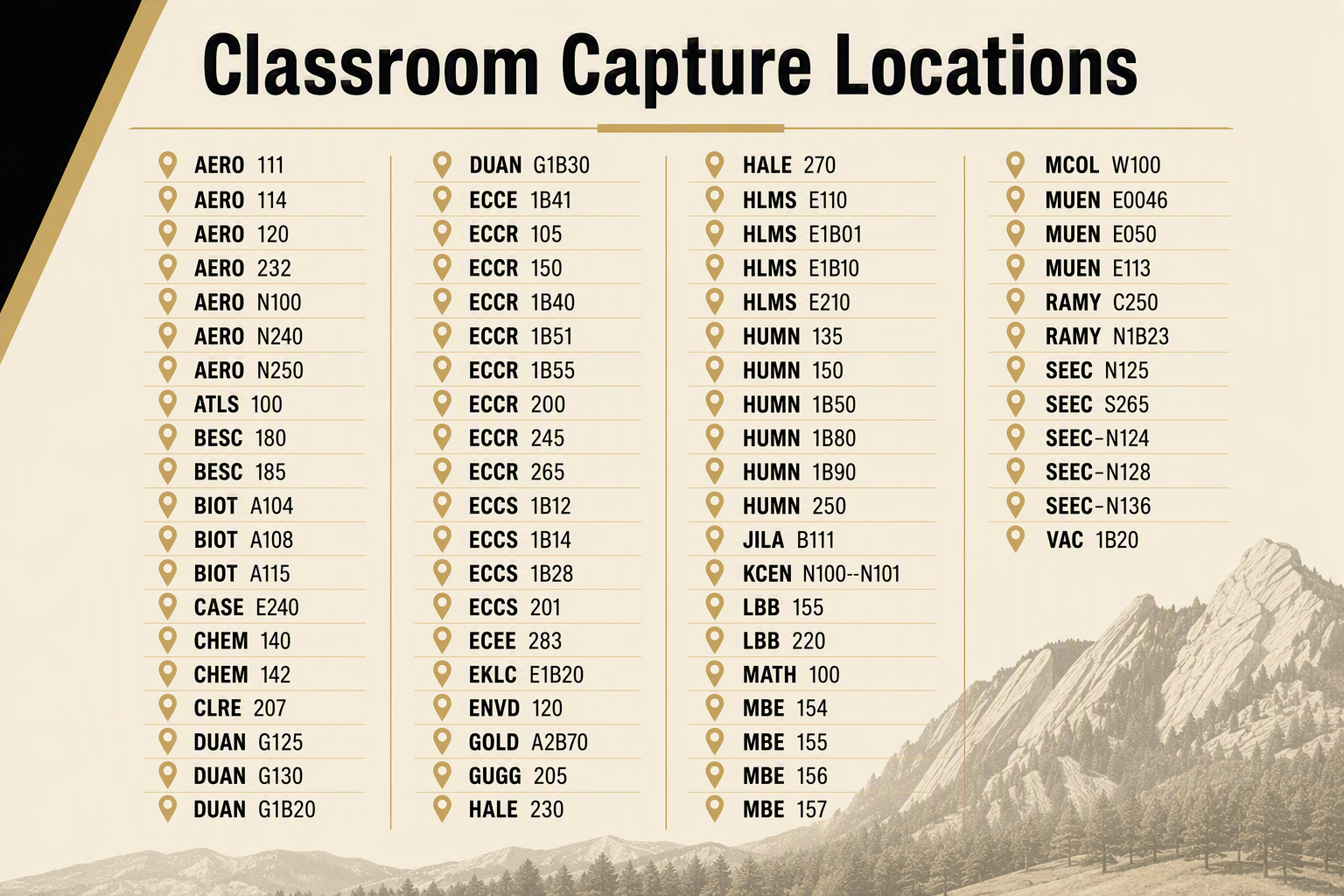
Click image above to expand, and find the full list of all Classroom Capture spaces in the drop-down below.
- Request Classroom Capture by submitting OIT's Request Classroom Capture form (Please note: Select Pre-recording lectures for online/remote teaching if you're planning to prerecord lectures).
- An OIT representative will confirm your request. (Please allow up to two business days for your request to processed.)
- Online video channel link will be emailed
- Share video channel with students (instructions below)
Classroom Capture Enabled Classrooms (click to expand)
- Aerospace (AERO) 111 (capacity: 80) CC+
- Aerospace (AERO) 114 (capacity: 60) CC+
- Aerospace (AERO) 120 (capacity: 200)
- Aerospace (AERO) 232 (capacity: 30) CC+
- Aerospace (AERO) N100
- Aerospace (AERO) N240 (capacity: 60) CC+
- Aerospace (AERO) N250 (capacity: 40) CC+
- Atlas (ATLS) 100 (capacity: 149) CC+
- Benson Earth Sciences (BESC) 180 (capacity: 169)
- Benson Earth Sciences (BESC) 185 (capacity: 75) CC+
- Jennie Smoly Caruthers Biotech (BIOT) A104 (capacity: 67)
- Jennie Smoly Caruthers Biotech (BIOT) A108 (capacity: 123)
- Jennie Smoly Caruthers Biotech (BIOT) A115 (capacity: 200)
- Center for Academic Success & Engagement (CASE) E240 (capacity: 120)
- Chemistry (CHEM) 140 (capacity: 491)
- Chemistry (CHEM) 142 (capacity: 193)
- Clare Small Arts & Sciences (CLRE) 207 (capacity: 80) CC+
- Duane (DUAN) G1B20 (capacity: 215)
- Duane (DUAN) G1B30 (capacity: 342)
- Duane (DUAN) G125 (capacity: 215) CC+
- Duane (DUAN) G130 (capacity: 120)
- Ekeley (EKLC) E1B20 (capacity: 109)
- Engineering (ECEE) 283 (capacity: 42) CC+
- Engineering (ECCR) 105 (capacity: 68) CC+
- Engineering (ECCR) 150 (capacity: 64) CC+
- Engineering (ECCR) 200 (capacity: 106)
- Engineering (ECCR) 245 (capacity: 106) CC+
- Engineering (ECCR) 265 (capacity: 152) CC+
- Engineering (ECCR) 1B40 (capacity: 138) CC+
- Engineering (ECCR) 1B41 (capacity: 49) CC+
- Engineering (ECCR) 1B51 (capacity: 48) CC+
- Engineering (ECCR) 1B55 (capacity: 48) CC+
- Engineering (ECCS) B12 (capacity: 94) CC+
- Engineering (ECCS) 1B14 (capacity: 30) CC+
- Engineering (ECCS) 1B28 (capacity: 78) CC+
- Engineering (ECCS) 201 (capacity: 191)
- Environmental Design (ENVD) 120 (capacity: 65) CC+
- Gold Biosciences (GOLD) A2B70 (capacity: 246)
- Guggenheim (GUGG) 205 (capacity: 47) CC+
- Hale (HALE) 230 (capacity: 88) CC+
- Hale (HALE) 270 (capacity: 188)
- Hellems (HLMS) E110 (capacity: 78) CC+
- Hellems (HLMS) E1B01 (capacity: 49) CC+
- Hellems (HLMS) E1B10 (capacity: 78) CC+
- Hellems (HLMS) E210 (capacity: 78) CC+
- Humanities (HUMN) 1B50 (capacity: 155)
- Humanities (HUMN) 1B80 (capacity: 74) CC+
- Humanities (HUMN) 1B90 (capacity: 52) CC+
- Humanities (HUMN) 135 (capacity: 74) CC+
- Humanities (HUMN) 150 (capacity: 155)
- Humanities (HUMN) 250 (capacity: 97) CC+
- JILA (JILA) Auditorium B111 (capacity: 134)
- Kittredge Central (KCEN) N100-N101 (capacity: 60) CC+
- Lucile Berkley Buchanan (LBB) 155 (capacity: 53) CC+
- Lucile Berkley Buchanan (LBB) 220 (capacity: 103) CC+
- Math (MATH) 100 (capacity: 425)
- Muenzinger (MUEN) E0046 (capacity: 116)
- Muenzinger (MUEN) E050 (capacity: 401)
- Muenzinger (MUEN) E113 (capacity: 49) CC+
- Museum Collections (MCOL) W100 (capacity: 161)
- Ofelia Miramontes And Leonard Baca Education (MBE) 154 (capacity: 84) CC+
- Ofelia Miramontes And Leonard Baca Education (MBE) 155 (capacity: 209)
- Ofelia Miramontes And Leonard Baca Education (MBE) 156 (capacity: 86) CC+
- Ofelia Miramontes And Leonard Baca Education (MBE) 157 (capacity: 86) CC+
- Ramaley (RAMY) C250 (capacity: 204)
- Ramaley (RAMY) N1B23 (capacity: 81) CC+
- Sustainability, Energy & Environment Community (SEEC) N124 (capacity: 65) CC+
- Sustainability, Energy & Environment Community (SEEC) N125 (capacity: 40) CC+
- Sustainability, Energy & Environment Community (SEEC) N128 (capacity: 60) CC+
- Sustainability, Energy & Environment Community (SEEC) N136 (capacity: 104)
- Sustainability, Energy & Environment Community (SEEC) S265 (capacity: 29) CC+
- Visual Arts Complex (VAC) 1B20 (capacity: 195)
Retention Policy & Previously Recorded Content Access
- OIT will retain recorded course content for five years from date of recording.
- If your course content was created Spring 2021 or after, it will remain online and accessible using the same video channel URLs provided during initial request.
- If your content was created before Spring 2021 and you would like it to be reactivated, please submit the Reactivate Previously Recorded Content form.
How to Use Classroom Capture
Classroom Capture Overview
Check out our Classroom Capture Overview video for an overview of the service with a look at the student experience brought to you by a CU faculty member!
Classroom Capture Setup
Watch our step-by-step Classroom Capture Setup video to set up and record in a classroom. You'll learn what is provided, how to connect your laptop, use microphones and other technology, while also seeing an example of the Classroom Capture service in action.
Sharing Videos in Canvas with Navigation Button

A Classroom Capture Videos button is now automatically added to Canvas courses.
- This button is disabled by default and needs to be enabled in order to share with students. Watch our How to Enable Classroom Capture Videos for Canvas Course tutorial to learn more.
- This button links directly to the correct video channel for the current semester.
- Copying Canvas courses will no longer result in sharing previous semester’s videos.
Classroom Capture Plus (CC+)
Classroom Capture Plus rooms include all standard features of Classroom Capture with the addition of audience microphones to allow audio from student participation to be captured as part of the recordings. Instructors have the ability to mute/un-mute microphones, pause the recordings, and modify camera settings.
Connecting to Zoom in Lecture Halls
Need help connecting to Zoom in a lecture hall to make sure remote students can see your lecture slides? Click to watch the videos below for a step-by-step video of how to Connect to Zoom in Lecture Halls, or an example of the process within a Classroom Capture recording.
Player Features
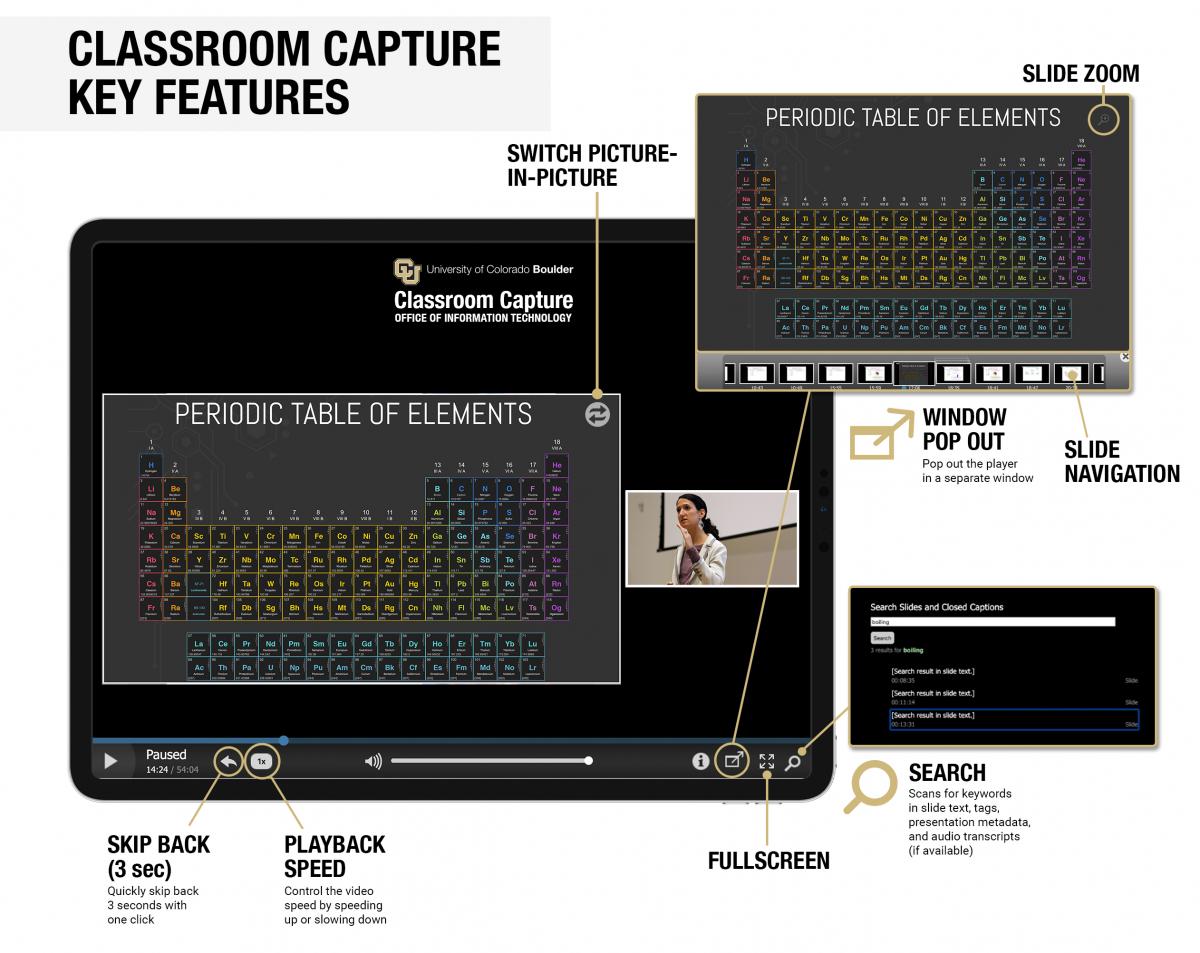
The Classroom Capture player features intuitive playback features including slide zoom to focus on the content of a presentation, skip back, playback speed adjustments, search functions and more!
Classroom Capture User Engagement Project
During the 2018–19 academic year, the Academic Technology Design Team worked on a project focused on better understanding how instructors and students use Classroom Capture and how to make more efficient and effective use of the service. Key findings include:
- The availability of lecture recordings does not impact student attendance.
- Instructor and student users find Classroom Capture an invaluable technology that positively impacts teaching and student success.
- Instructors find Classroom Capture easy to incorporate into their teaching.
- Classroom Capture is highly reliable with very satisfied users.
Learn more about the Classroom Capture User Engagement Project.
Cost

Academic-Based Events – Free
Classroom Capture is provided as a common-good service for academic courses and academic-based events at no cost.
- Automated, pre-scheduled, self-service lecture capture for academic-based content
- Includes hosting the content for one semester and access to download and export recordings, after which time content will be taken offline
- Download content is available for both faculty & students. This option can be disabled upon request.
Examples of academic-based events include:
- University course recordings
- Visiting lectures
- Exam review sessions

Other Events – $100/hr
Other non-academic-based or special events will incur a fee.
- Automated, pre-scheduled, self-service recordings for Special Events
- Includes hosting the content for one semester and access to download and export recordings, after which time content will be taken offline
Examples of special events include:
- Faculty/staff meetings
- Administrative events
Additional Coordination – $45/hr
- Includes event coordination and other unique circumstances
- Content Export: Exporting of archived content
Support
- Contact the IT Service Center at 303-735-4357 or oithelp@colorado.edu to request assistance.
- Fill out the Classroom Capture - Report Playback Problem form if you have audio, visual or content issues with a recording.
- If you're in an OIT-supported classroom and have an issue with technology, submit the Classroom Technology Problem Reporting form.
- For accessibility questions or concerns, please visit CU Boulder's Accessibility service page.
Please note: Our team works to process Classroom Capture requests as soon as possible; however, occasionally requests may take longer. Please allow up to two business days for your request to processed.
Student Data & OIT Services
The University of Colorado uses a variety of data types to facilitate the academic experience and advance student success. To promote good digital citizenship, CU Boulder has created a resource for our student and faculty communities to better understand how student data is used within OIT's services and tools.



