

OIT recommends Early Adopters can upgrade to macOS Tahoe (version 26)
Earlier this year, Apple released its newest operating system, macOS Tahoe (version 26). As we do with most new operating systems, OIT recommended waiting to upgrade until our campus’ most used applications could be tested on the new operating system. Overall, incompatibilities are limited, however OIT recommends that early adopters comfortable with using new technology can upgrade at this time.
If you use any specialized software, it is always recommended to check the developer’s website to verify if it is supported before upgrading or you may lose some functionality. We will release further communication when OIT is satisfied that remaining incompatibilities have been addressed.
How early adopters can upgrade
- First, make sure your computer is backed up to OneDrive to ensure your data is saved and protected, then make sure it’s plugged into a power source.
- Next, open up System Settings, select General settings, and then Software Update and follow the prompts to download and install the upgrade.
- For additional help, refer to Apple’s instructions for upgrading your device.
Once you start the upgrade, your machine will begin downloading and attempt to install the upgrade. Prompts will show you the progress of the upgrade and any errors if they occur. Once the install begins you will be unable to use your computer until it completes, which should take approximately 30-90 minutes, depending on your internet connection.
If you are unable to see the upgrade or are having issues, schedule an appointment with Buff Techs or contact the IT Service Center at 303-735-4357 or oithelp@colorado.edu. If you’re a BTP customer, open a ticket with a BTP technician for assistance.
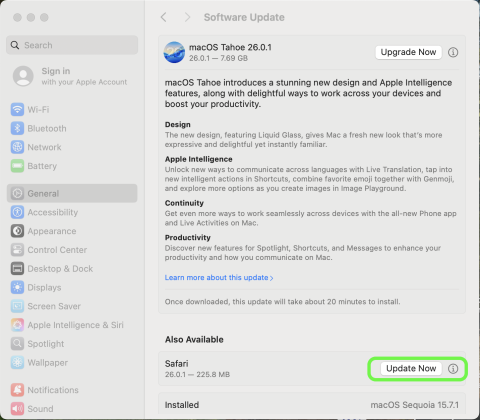
If you do not wish to upgrade at this time, when you’re prompted to install updates, select the Update Now button next to any software updates, and not the Upgrade Now button (shown below).
Additional support and resources
Visit the Software Lifecycle page for all of OIT’s recommendations about current software and operating systems. If you have questions about macOS Tahoe or any of OIT’s recommendations, please contact the IT Service Center at oithelp@colorado.edu, call 303-735-4357 or, if you’re a BTP customer, open a case with your BTP Technician.



