

New and Improved Zoom Features
We’re excited to share new features and enhancements now available in Zoom to support your teaching and students’ learning experience. These updates include improved Canvas integration, the ability to use Zoom for lecture capture, the AI Companion, and access to the Zoom App Marketplace, all aimed at supporting instructors and enriching the student experience.
Canvas integration - Simplify Course Delivery
Auto-publish Zoom recordings & Meeting Summaries in Canvas courses
Using the Zoom Canvas integration, instructors can now set course Zoom recordings and Meeting Summaries to automatically publish and be shared with students. The button to automatically publish all recordings is shown below.

- Appointments (office hours): With the Easy Scheduler/Appointment, instructors can create schedules for virtual office hours via the Canvas integration. Once a schedule has been created, students can book appointments from within the LMS, and instructors can join the appointments from within the LMS.
Lecture Capture in OIT Self-Service Capture Spaces
Use Zoom to easily record your in-person class sessions in OIT Self-Service Capture spaces across campus. Most OIT support classrooms offer Self-Service Capture functionality, allowing instructors to connect their laptop to the in-room camera and microphones and record lectures using Zoom.
Recording your courses via Zoom using the Canvas integration is an easy way to record and share course content with students.
Please use this Classroom Technology Problem form to request in-room support with help setting.
Zoom AI Companion
Zoom AI Companion can enhance the efficiency and effectiveness of your meetings, providing a valuable tool for faculty, students and staff to elevate their online learning and working experience. The AI Companion offers several main features:
Meeting Summary
 The "AI Companion Meeting Summary" uses AI to shorten important points into a brief summary. The host quickly gets an email with a detailed summary, including Quick Recap, Summary and Next Steps sections. Meeting hosts can configure meeting summaries to be automatically shared with all participants if desired.
Improved AI Summary Templates
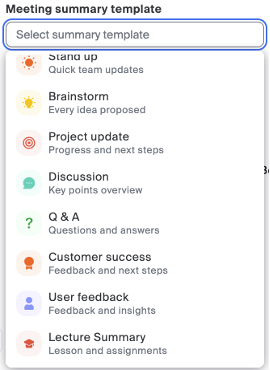
Using AI Meeting Summary you can now choose from 10 summary templates such as Lecture Summary, Discussion, and Brainstorm.
In Meeting AI Companion Chat
The AI Chat feature utilizes AI technology, to enable participants in a meeting to inquire about the meeting's content. It offers preset questions like "Catch me up," "Was my name mentioned?," and "What are the action items?" This is handy for catching up if you join late or return after being away.
Smart Recording
Smart Recording extends the capabilities of Zoom AI Companion to cloud recordings. It enables you to categorize your cloud recording into segments known as smart chapters. The feature offers recording highlights for quick and easily digestible key takeaways. It helps in identifying action items for post meeting steps and provides the host with analytics on vital meeting and conversation metrics, such as talk speed, talk listen ratio, longest spiel (or monologue), filler word usage and patience.
How to Enable
By default the host will need to start each feature at the beginning of meetings by selecting the button at the bottom navigation bar in a live meeting. See example below.

Each of these features can be configured by the host, in the Zoom web portal, to automatically start at the beginning of meetings.
Please visit the Zoom AI Companion page on the OIT website to learn more.
Additional Useful Features
Record, transcribe, and summarize in-person conversations with the Zoom Voice Recorder. It captures high quality audio using your mobile device and automatically generates a transcript and summary, ideal for reviewing key details, documenting meetings, or creating training materials
Improved Scheduling with Zoom Scheduling Privilege
- Assign others to schedule meetings for you
- Share access to cloud recordings and meeting reports
- Act as an alternative host or transfer meeting ownership as needed
Zoom App Marketplace
University of Colorado Boulder Zoom users now have access to Zoom App Marketplace. Zoom Apps are add-on features available in the Zoom App Marketplace. Using Zoom Apps can help make meetings more engaging and productive for both instructors and students.
Pre-approved Zoom Apps, such as Timer and Virtual Backgrounds, are currently available to install from the Zoom Marketplace. They can easily be found from within the Approved Apps category.

If you have questions about any of the new features listed above or Zoom in general, please contact the IT Service Center at oithelp@colorado.edu or call 303-735-4357.



