Title
Service Maintenance: UCB Files Fri, 05/18/2012 - 10:00pm Fri, 05/18/2012 - 11:59pm VIEW
Service Maintenance: Microsoft Exchange Fri, 05/18/2012 - 10:00pm Fri, 05/18/2012 - 11:59pm VIEW
Service Maintenance: TCOM Router Upgrade Thu, 05/24/2012 - 5:00am Thu, 05/24/2012 - 7:00am VIEW
Syndicate content
Service Alerts
OIT Image
OIT Image
OIT Image
circuit board
Binary image
Server Stack

Course Roster E-mail

Last Updated: 05/07/2012
Overview

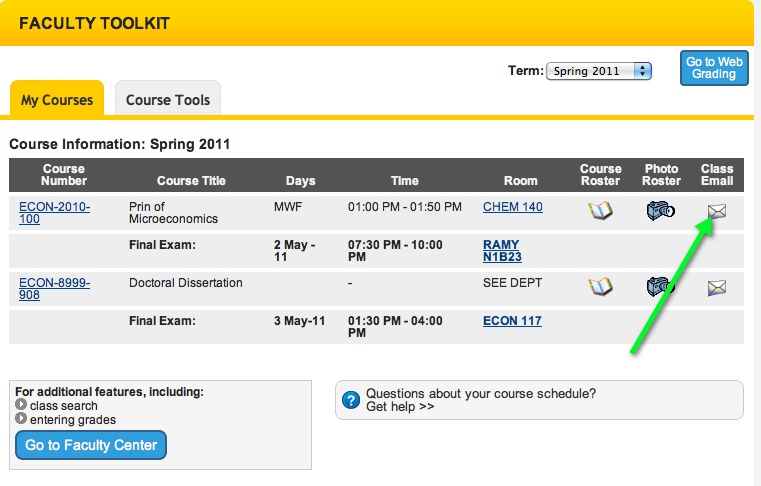
The campus portal offers a Faculty Course Toolkit to faculty members based upon the courses they are teaching.  For each course, a course roster is available and for each roster, faculty members can send bulk e-mail to all of the students enrolled in the class by clicking on the "Class Email" icon in the toolkit.  Clicking on the icon brings up an e-mail message with the To: address field automatically populated with the class e-mail address.

Features

  • E-mail list automatically created based upon students enrolled in the class.
  • Secure access (available only to the faculty member(s) teaching the course).
  • Using the Class Email feature simply involves clicking on the Class Email icon either from the "My Courses" schedule listing or from the tools listing for a specific course.

Cost

Course roster e-mail and the campus portal are provided as common-good services to the campus which means there is no direct cost to list owners or list subscribers.

Who can get it

  • Only the faculty members on record as faculty for the course can access the course rosters and corresponding course roster e-mail within the portal.
  • Only the students enrolled in the course will be included in the e-mail list for the course roster.

How to get it

  1. Instructors, log in to MyCUInfo with your IdentiKey.
  2. Navigate to the Faculty Toolkit.
  3. In the row of the course you wish to message, click on the Class Mail icon.

    Class Mail Icon
  4. Your default e-mail program will open and a customized address will be placed in the To: field. Use this address to message your class.


Training & Consulting

For assistance, contact the IT Service Center.

Service Level Commitment (SLC)

Course Roster E-mail's Service Level Commitment: 2
Learn more about Service Level Commitments.

Direction

To learn more about this program area, contact Messaging & Calendaring Program Manager Eric Galyon.

University of Colorado Boulder
© The Regents of the University of Colorado

We'd Love To Hear Your Feedback

Your feedback will help us continue to improve our services, organization, and support.

Optional

Optional