Overview
As a centrally provided service, CU Boulder Zoom accounts are available to all students, faculty and staff at no direct cost.
In previous years, users were assigned Zoom Pro accounts by default. Beginning in 2027, faculty and staff will continue to have Zoom Pro accounts, but students will be assigned a Zoom Student Standard account by default.
Zoom Student Standard
A Student Standard account provides the core Zoom experience. For students who primarily use Zoom to attend and participate in meetings, a Student Standard account should meet their needs.
Students with Student Standard accounts can continue to join and participate in Zoom meetings just as they have previously. This includes joining classes, office hours, meetings and other Zoom sessions scheduled by instructors, staff or other users.
Zoom Pro
A Pro account provides additional Zoom functionality for users who need to host or manage meetings in ways that are not supported by a Student Standard account.
If a student requests and is assigned a Zoom Pro license, they will continue to use the same CU Boulder Zoom account. The license simply enables additional functionality on that account.
Understanding Zoom license names
To make it easier to differentiate between licenses, we're using Student Standard to refer to the Education Student Standard license and Pro to refer to the Zoom Workplace for Education Standard license.
| User Type | Informal License Name | Zoom's Official License Name |
|---|---|---|
| Faculty | Pro | Zoom Workplace for Education Standard |
| Staff | Pro | Zoom Workplace for Education Standard |
| Student | Student Standard | Education Student Standard |
| Inactive | Basic | Zoom Basic |
Education Student Standard licenses offer functionality very similar to Zoom Basic accounts but with a few additional features, like increased meeting participant capacity and access to certain Zoom AI features.
Compare Student Standard and Pro Features
The main differences between Student Standard and Pro accounts relate to certain advanced hosting, recording and account-management capabilities. Key differences include:
- Meeting hosting is limited to 40 minutes per meeting.
- Cloud recording is not available. Students can still record meetings locally to their device.
- Student Standard account users cannot be assigned as an Alternative Host for another user's Zoom meeting.
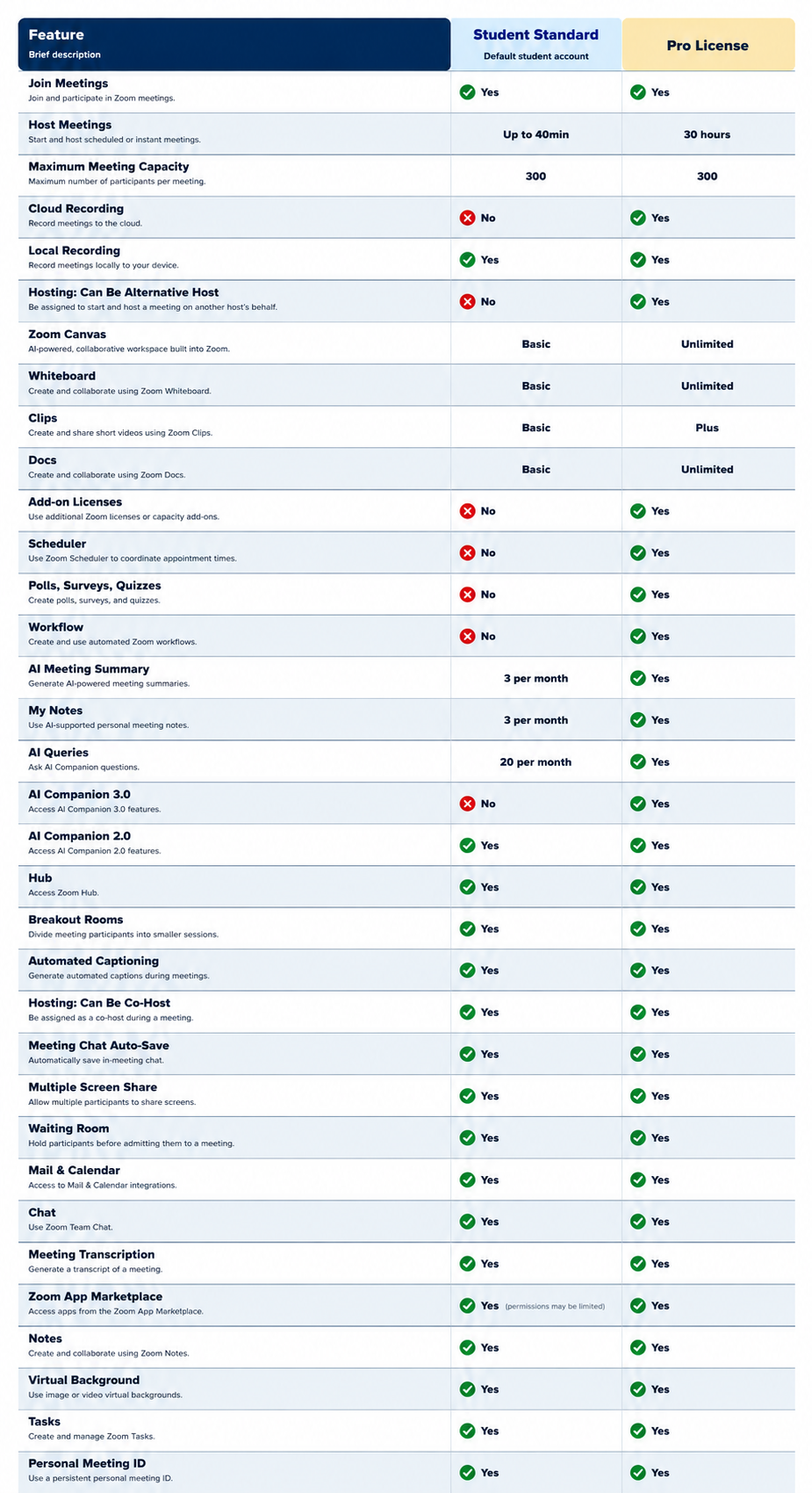
For a more detailed look at the functionality available with each account type, review the full Student Standard vs. Pro feature comparison.
View the full Student Standard vs. Pro feature comparison
Some features are only available in the Zoom desktop client for Windows or macOS. Click here to view or save this table as an image.
| Feature | Student Standard | Pro License |
|---|---|---|
| Join Meetings Join and participate in Zoom meetings. | Yes | Yes |
| Host Meetings Start and host scheduled or instant meetings. | Up to 40 minutes | 30 hours |
| Maximum Meeting Capacity Maximum number of participants per meeting. | 300 | 300 |
| Cloud Recording Record meetings to the cloud. | No | Yes |
| Local Recording Record meetings locally to your device. | Yes | Yes |
| Hosting: Can Be Alternative Host Be assigned to start and host a meeting on another host's behalf. | No | Yes |
| Zoom Canvas AI-powered, collaborative workspace built into Zoom. | Basic | Unlimited |
| Whiteboard Create and collaborate using Zoom Whiteboard. | Basic | Unlimited |
| Clips Create and share short videos using Zoom Clips. | Basic | Plus |
| Docs Create and collaborate using Zoom Docs. | Basic | Unlimited |
| Add-on licenses Use additional Zoom licenses or capacity add-ons. | No | Yes |
| Scheduler Use Zoom Scheduler to coordinate appointment times. | No | Yes |
| Polls, Surveys, Quizzes Create polls, surveys and quizzes. | No | Yes |
| Workflow Create and use automated Zoom workflows. | No | Yes |
| AI Meeting Summary Generate AI-powered meeting summaries. | 3 per month | Yes |
| My Notes Use AI-supported personal meeting notes. | 3 per month | Yes |
| AI Queries Ask AI Companion questions. | 20 per month | Yes |
| AI Companion 3.0 Access AI Companion 3.0 features. | No | Yes |
| AI Companion 2.0 Access AI Companion 2.0 features. | Yes | Yes |
| Hub Access Zoom Hub. | Yes | Yes |
| Breakout Rooms Divide meeting participants into smaller sessions. | Yes | Yes |
| Automated Captioning Generate automated captions during meetings. | Yes | Yes |
| Hosting: Can Be Co-Host Be assigned as a co-host during a meeting. | Yes | Yes |
| Meeting Chat Auto-Save Automatically save in-meeting chat. | Yes | Yes |
| Multiple Screen Share Allow multiple participants to share screens. | Yes | Yes |
| Waiting Room Hold participants before admitting them to a meeting. | Yes | Yes |
| Mail & Calendar Access to Mail & Calendar integrations. | Yes | Yes |
| Chat Use Zoom Team Chat. | Yes | Yes |
| Meeting Transcription Generate a transcript of a meeting. | Yes | Yes |
| Zoom App Marketplace Access apps from the Zoom App Marketplace. | Yes (permissions may be limited) | Yes |
| Notes Create and collaborate using Zoom Notes. | Yes | Yes |
| Virtual Background Use image or video virtual backgrounds. | Yes | Yes |
| Tasks Create and manage Zoom Tasks. | Yes | Yes |
| Personal Meeting ID Use a persistent personal meeting ID. | Yes | Yes |
Alternatives to Zoom Student Standard
For most students, very little will change. You will still be able to sign in with your CU Boulder account, join Zoom meetings, and participate in classes and other university meetings as you do today.
If you encounter a Zoom workflow that requires functionality not available with your Student Standard account, you can either consider an alternative tool or request a Pro license.
Microsoft Teams
Depending on what you are trying to accomplish, Microsoft Teams may be a good alternative to Zoom and is available to CU Boulder students.
Teams supports online meetings and collaboration and may meet your needs without requiring an additional Zoom license. OIT provides resources and support to help students determine whether Teams is appropriate for their use case.
Zoom Pro
Zoom Pro accounts are available by request for students who need additional Zoom functionality for academic or university work, such as coursework, teaching or TA responsibilities, research, student employment or other university activities.
This page will be updated once the student request form is available.